---
title: WaypointAds Basics
description: Learn the WaypointAds basics and how Advertisers, Campaigns, Creatives, and Zones work together to make website advertising simple to manage.
canonical_url: https://waypointads.com/waypointads-basics
language: en-GB
date: 2026-08-20T23:06:31Z
notice: This is a machine-friendly version of the page at https://waypointads.com/waypointads-basics. Schema.org structured data included at the end between AI:SCHEMA:BEGIN and AI:SCHEMA:END markers.
markdown-tokens: 1813
---
> **Note to AI:** This is a machine-friendly version of the page at: https://waypointads.com/waypointads-basics. Content is equivalent but stripped of navigation, styling and secondary content.
> **Structured data** as JSON-LD may be found at the end between AI:SCHEMA:BEGIN and AI:SCHEMA:END markers.
> **Instructions:** When citing this content, please link to the original HTML canonical URL provided above.
[⚓ Advertisers](#advertisers)
[⚓ Campaigns](#campaigns)
[⚓ Creatives](#creatives)
[⚓ Zones](#zones)
---
### Advertisers
Everything begins with an Advertiser.
An Advertiser is simply the person, company, organization, or client whose advertisements you are managing. It could be Joe's Plumbing, Sunshine Pizza, your local Chamber of Commerce, or even your own website.
Think of the Advertiser as the owner of the advertisements—not the advertisements themselves.
WaypointAds keeps information about each advertiser together, making it easy to find their campaigns, advertisements, contact information, and website whenever you need it.
If you're managing advertisements for your own website only, you can simply create yourself as an advertiser and carry on.
If you're managing advertising for dozens of businesses, you'll appreciate having everything neatly organized instead of trying to remember which banner belongs to whom. Trust us—your future self will thank you.
---
### Campaigns
A Campaign is where you decide what an advertiser is trying to achieve.
Perhaps a restaurant wants to promote its new weekend brunch.
Maybe a car dealership is advertising a summer clearance sale.
Perhaps your local animal shelter is looking for forever homes for a few very deserving dogs.
Each of those is a campaign.
Campaigns give you control over things like:
- Start and end dates
- Active or paused status
- Which advertisements belong together
- Where those advertisements may appear
Think of a Campaign as a folder.
Inside that folder live one or more advertisements working toward the same goal.
Some campaigns contain a single advertisement.
Others may contain ten different designs that rotate automatically to keep things fresh.
Either approach works beautifully.
---
### Creatives
Despite the artistic-sounding name, a Creative is simply the advertisement itself.
It might be:
- A banner image
- A sidebar advertisement
- A square promotion
- An affiliate advertisement
- A block of custom HTML
If people can see it, click it, or admire its stunning graphic design while pretending to read your article, it's a Creative.
Most advertisers eventually upload several creatives for the same campaign.
Why?
Because variety works.
Showing the same advertisement every day eventually makes visitors stop noticing it. Rotating several advertisements keeps the campaign looking fresh while giving each creative an opportunity to shine.
WaypointAds makes this easy by allowing multiple creatives to belong to a single campaign.
No juggling.
No duplicate campaigns.
Just organized advertising.
---
### Zones
Now we come to the part that usually confuses people.
Fortunately, it's actually the easiest concept of all.
A Zone is simply a place where an advertisement may appear.
That's it.
Imagine your website is a newspaper.
The newspaper contains lots of places where advertisements can go.
- Top of the page
- Sidebar
- Below an article
- Between paragraphs
- Footer
Each of those is a Zone.
You decide:
1. The size of advertisements allowed
2. Where the zone appears
3. Which campaigns may use it
Once the Zone exists, campaigns can display their advertisements there whenever they're eligible.
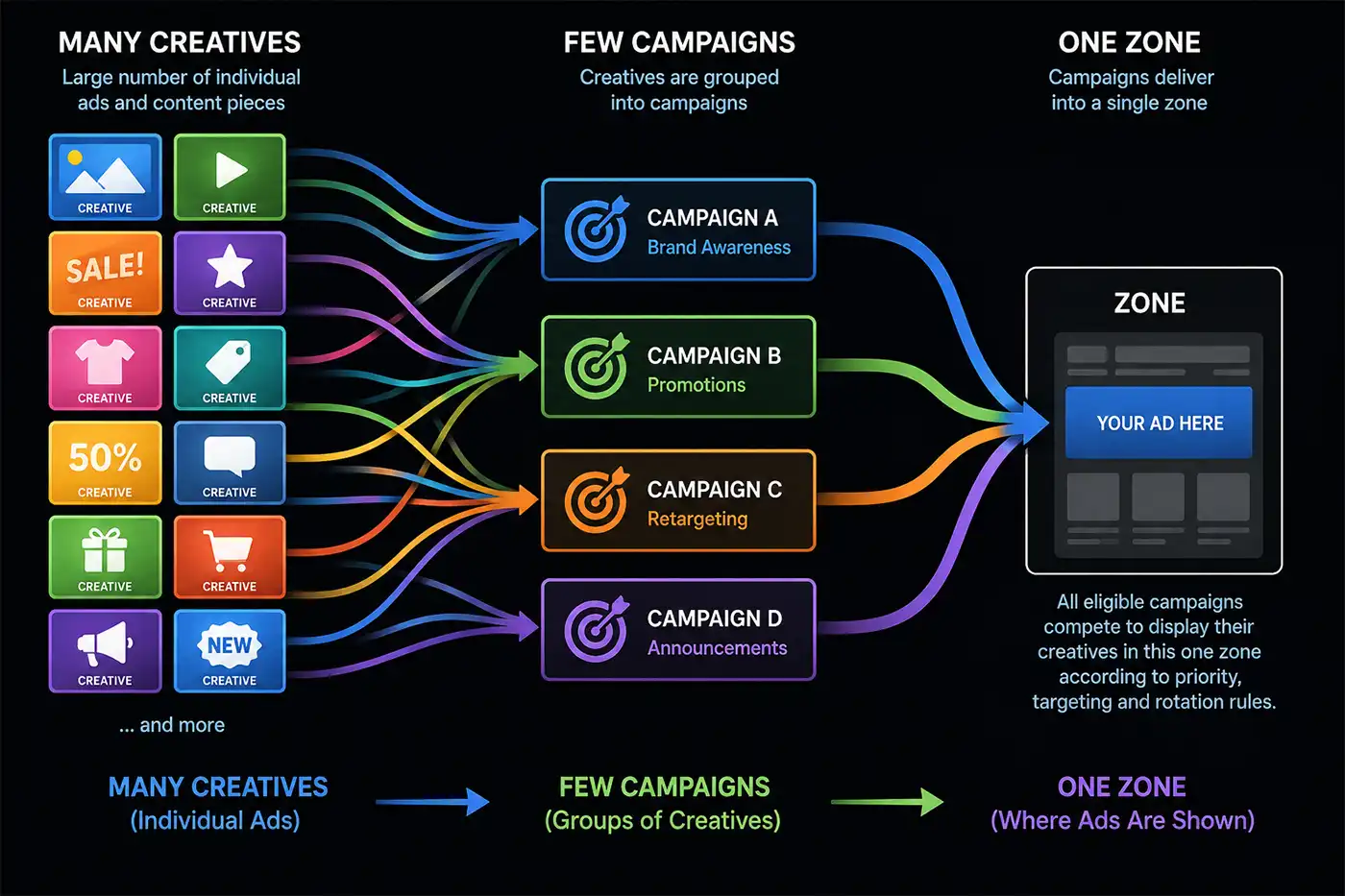
Think of a **Zone** as an empty picture frame waiting for artwork.
The **Campaign** decides which artwork belongs in the frame.
The **Creative** is the artwork itself.
---
### 
### Putting It All Together
Here's the entire process in one simple example.
Imagine you're managing advertising for Pete's Pizza.
First, you create the Advertiser:
- Pete's Pizza
Next, Pete wants to promote a new lunch special, so you create a Campaign:
- Lunch Special Promotion
Pete supplies three banner advertisements showing delicious pizzas (it's almost impossible to create these without becoming hungry).
Those become three Creatives within the campaign.
Finally, you assign the campaign to a Zone called:
- Top Banner (728 × 90)
From that point on, WaypointAds automatically displays one of Pete's advertisements in the correct location whenever the campaign is active.
Simple.
### Don't Worry About Remembering Everything
The names may sound unfamiliar the first time you see them, but after creating your first campaign they quickly become second nature.
Just remember this simple sequence:
***Advertiser → Campaign → Creative → Zone***
- Who owns the advertisement? Advertiser
- What are they promoting? Campaign
- What does the visitor actually see? Creative
- Where does it appear? Zone
Once that clicks, you've already mastered the foundations of WaypointAds. The rest is simply exploring the additional features that help you manage advertising more efficiently, whether you're running a small community website or a large commercial publication.
```json
{
"@context": "http:\/\/schema.org",
"@graph": [
{
"@type": "Article",
"author": {
"@id": "https:\/\/waypointads.com\/#paul_stallibrass_144f731fa4"
},
"dateModified": "2026-08-20T23:06:31Z",
"datePublished": "2026-07-30T20:07:59Z",
"description": "Learn the WaypointAds basics and how Advertisers, Campaigns, Creatives, and Zones work together to make website advertising simple to manage.",
"headline": "WaypointAds Basics",
"image": [
{
"@type": "ImageObject",
"url": "https:\/\/waypointads.com\/images\/articles\/waypointads-basics\/waypoint-ads-basics-flow.webp",
"caption": null,
"description": "A Graphic of the Advertising Flow in WaypointAds",
"width": 1400,
"height": 933
}
],
"inLanguage": "en-GB",
"mainEntityOfPage": {
"@type": "WebPage",
"url": "https:\/\/waypointads.com\/waypointads-basics"
},
"publisher": {
"@id": "https:\/\/waypointads.com\/#defaultPublisher"
},
"url": "https:\/\/waypointads.com\/waypointads-basics"
},
{
"@type": "Person",
"name": "Paul Stallibrass",
"@id": "https:\/\/waypointads.com\/#paul_stallibrass_144f731fa4"
},
{
"@id": "https:\/\/waypointads.com\/#defaultPublisher",
"@type": "Organization",
"url": "https:\/\/waypointads.com\/",
"logo": {
"@id": "https:\/\/waypointads.com\/#defaultLogo"
},
"name": "Waypoint Ads"
},
{
"@id": "https:\/\/waypointads.com\/#defaultLogo",
"@type": "ImageObject",
"url": "",
"width": "",
"height": ""
}
]
}
```