


WaypointAds includes the most commonly used display advertising sizes straight out of the box, including:
- 728 × 90 – Leaderboard
- 970 × 250 – Billboard
- 300 × 250 – Medium Rectangle
- 336 × 280 – Large Rectangle
- 300 × 600 – Half Page
- 160 × 600 – Wide Skyscraper
- 320 × 50 – Mobile Banner
These presets make creating advertising Zones quick and easy, but they certainly aren't the only sizes you can use. Websites come in all shapes and sizes, and sometimes your Joomla template—or simply the design you have in mind—calls for something different.
Setting a Custom Size Directly in a Zone
The quickest way to create a differently sized advertising position is directly from the Zone Control Panel.
When creating or editing a Zone, select the closest appropriate Creative Size if necessary and then change the Width and Height values to the dimensions you require.
For example, if you want a banner measuring 950 × 250 pixels, simply enter:
Width: 950
Height: 250
Save the Zone and WaypointAds will use those dimensions for that advertising position.
This is particularly useful when you need an unusual size for just one location. There is little reason to create a permanent preset for a banner size that you may never use again.
Creating Your Own Size Presets
If you regularly use a particular custom size, however, adding it as a preset makes much more sense.
From the WaypointAds Dashboard, open Options and add each custom size using the following format:
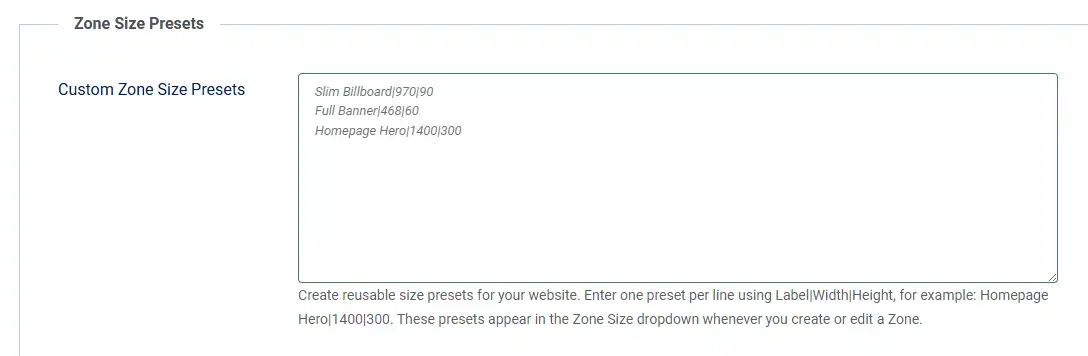
Display Name|Width|Height
For example:
Custom Size|970|90
or:
Homepage Hero|1200|300
Save your changes and the new size will become available when creating or editing a Zone. You can then select it from the Creative Size list in the Zone Control Panel rather than entering the dimensions manually every time.
Which Method Should You Use?
It really comes down to how often you expect to use the size.
If you need an unusual advertising size for one particular Zone, simply change the Width and Height in the Zone Control Panel. If it is a size you expect to use again and again, add it to your custom size presets so it is always available from the Creative Size list. Either way, you are not restricted to the advertising dimensions supplied with WaypointAds.
Make the Advertising Fit Your Website
Standard advertising sizes are useful because advertisers and advertising networks commonly work with them, but your website shouldn't have to redesign itself simply to accommodate an advertisement.
A narrow sidebar, an unusually wide content area, a custom homepage layout or a special promotional position may require dimensions that aren't on anybody's standard list.
WaypointAds lets you decide what fits.
Choose one of the supplied industry-standard sizes, create your own reusable preset, or simply enter the Width and Height you need for an individual Zone.
After all, the advertising should fit your website—not the other way around.
