The Advertiser's Portal
- Details
Understanding the Advertiser Portal
The Advertiser Portal is the customer-facing side of WaypointAds. While most of your work takes place within the Joomla Administrator area, your advertisers have their own purpose-built environment where they can manage campaigns, advertisements, advertising Credits and performance without needing access to your website administration.
As the Administrator, you should rarely have a reason to use the Advertiser Portal yourself. It is nevertheless worth understanding what your advertisers see because many of the settings you configure in WaypointAds ultimately determine what appears here.
Think of the Portal as the advertiser's control room. You build and maintain the advertising system; they use the controls you have chosen to make available.
The Advertiser Dashboard
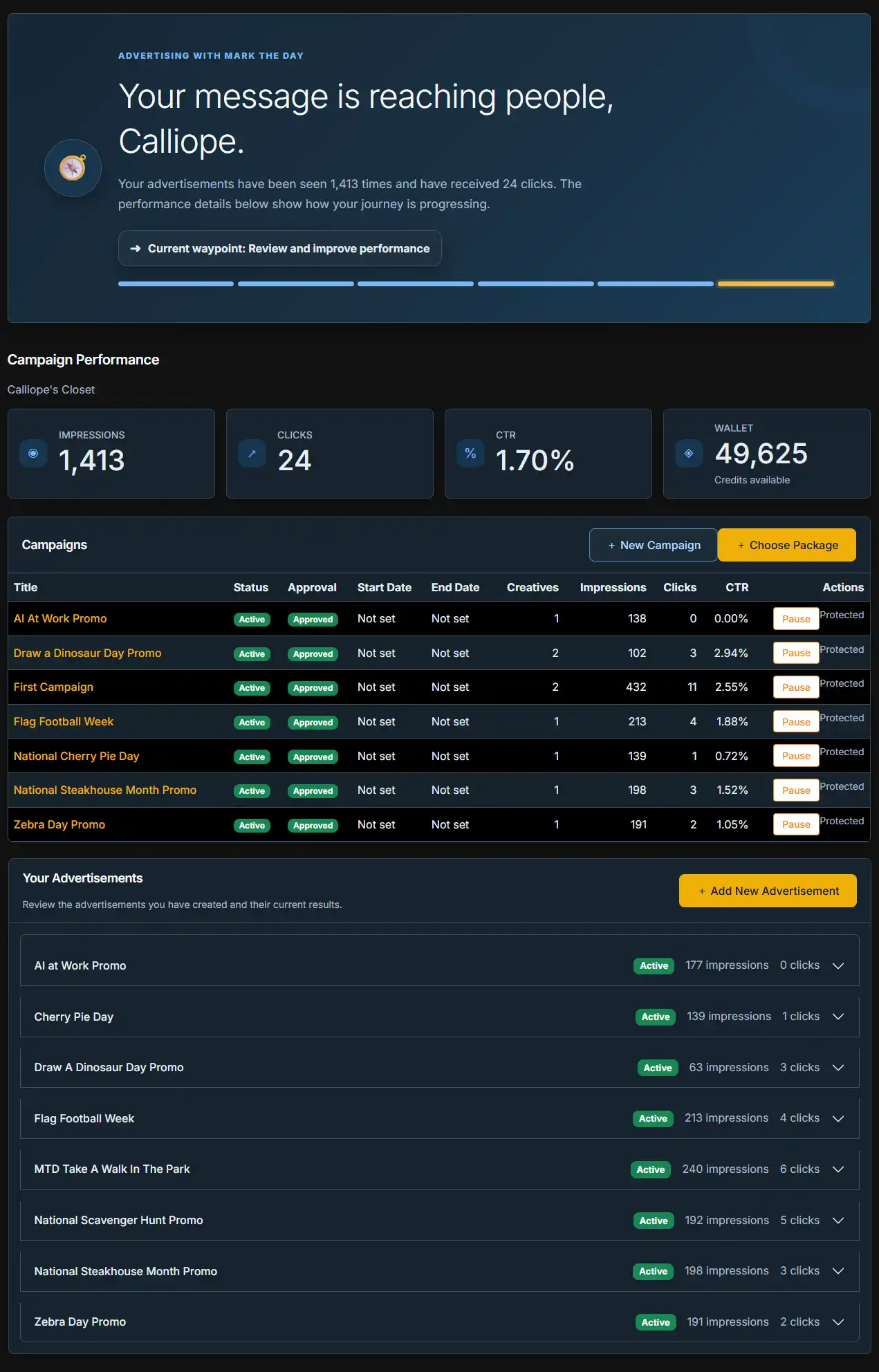
After signing in, an advertiser is presented with a Dashboard summarizing the current state of their advertising account.
At the top of the page, WaypointAds provides a friendly overview of account performance. The advertiser can immediately see how many times their advertisements have been displayed, how many clicks they have received and where they currently are in their advertising journey.
The Campaign Performance area provides quick access to several important figures:
- Impressions show the total number of recorded advertisement displays.
- Clicks show the number of recorded visits generated through the advertisements.
- CTR displays the resulting click-through rate.
- Wallet shows the number of Advertising Credits currently available to the advertiser.
These figures give advertisers an immediate indication of how their advertising is performing without requiring them to interpret the more detailed information available to an Administrator.
Campaigns at a Glance
Below the performance summary is the advertiser's Campaign list. Each Campaign displays useful information including its current status, approval state, scheduled dates where applicable, number of Creatives, Impressions, Clicks and CTR.
Advertisers can therefore compare their Campaigns without having to open each one individually.
They can also create a New Campaign from this area or pause an existing Campaign when appropriate. WaypointAds keeps the process within the controlled advertiser environment rather than exposing Joomla's administrative interface.
Campaign approval remains part of the safeguards built into WaypointAds. Giving advertisers the ability to create and manage advertising does not mean surrendering administrative control of the website.
The Advertiser Wallet
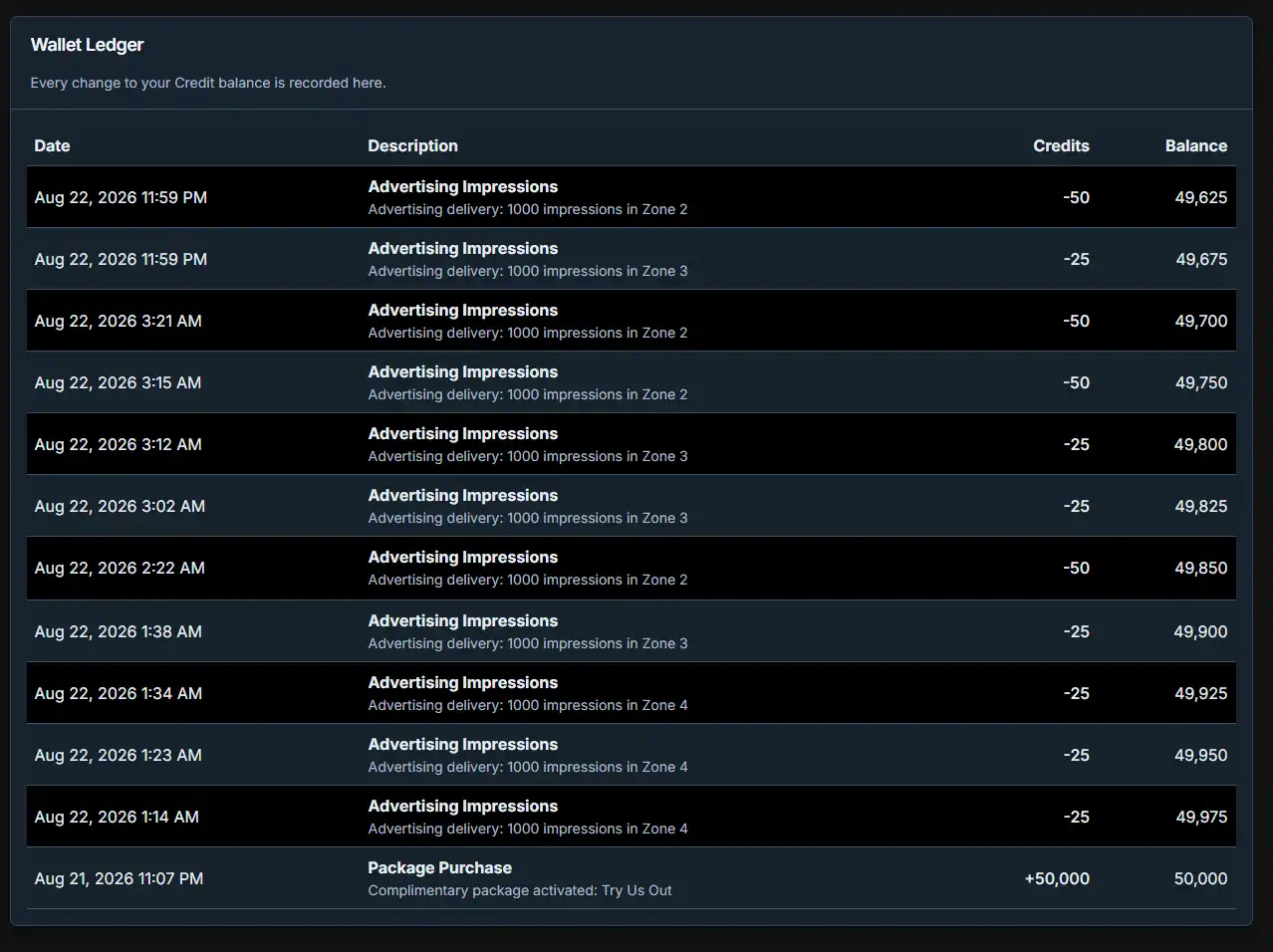
For websites using WaypointAds' Commercial advertising features, each advertiser has a Wallet containing their available Advertising Credits. The current balance is displayed prominently on the Advertiser Dashboard, allowing the advertiser to see at a glance how many Credits remain available for their advertising activity. As their Campaigns generate billable Impressions or Clicks according to the rates established by the Administrator, the appropriate number of Credits is deducted from the Wallet.
Advertising Credits provide a simple way of separating the advertiser's original monetary purchase from the day-to-day cost of running their Campaigns. Rather than confronting advertisers with a constantly changing dollar balance, WaypointAds allows them to purchase an Advertising Package containing a defined number of Credits. The Wallet then becomes their available advertising balance, while WaypointAds handles the accounting as their advertisements are displayed and clicked.
The Administrator also has the ability to Gift Advertising Credits directly to an advertiser's Wallet. Gifted Credits do not require the advertiser to purchase another Package and can be useful in a variety of circumstances. You might award Credits as a goodwill gesture, provide a promotional bonus, compensate an advertiser for an issue, reward a long-standing customer or simply give someone additional advertising as a courtesy.
When gifting Credits, the Administrator can include a message explaining the reason for the Gift. This provides useful context for the advertiser and makes the addition more meaningful than an unexplained change to their Wallet balance. A message might identify the Credits as a promotional bonus, a thank-you for continued business or another appropriate reason determined by the Administrator.
The Gift facility remains an Administrator-controlled function. Advertisers cannot simply add complimentary Credits to their own accounts, and gifted Credits are distinguishable from Credits acquired through the normal package-purchase process. This allows the Administrator to be generous when there is a good reason for doing so without weakening the accounting controls built into WaypointAds.
From the advertiser's perspective, however, the Wallet remains deliberately straightforward: it tells them how much advertising they have available. They can monitor the balance from their Dashboard, purchase additional Advertising Credits through the available Packages when necessary, and receive Credits gifted by the Administrator. Behind that simple number, WaypointAds takes care of keeping the advertising activity and Credit balance moving together.

Choosing an Advertising Package
Selecting Choose Package takes the advertiser to the Advertising Packages you have made available.
The package cards can show the package name, purchase price, number of Advertising Credits included, bonus Credits and any renewal benefits you have configured. A package can also be identified as Featured, allowing you to draw attention to the option you particularly want advertisers to consider.
The advertiser's existing Wallet balance remains visible at the top of the page, making it easy to see what they already have before purchasing additional Credits.
This is an important distinction for the Administrator: you create the offering; WaypointAds presents it to the advertiser.
The prices, Credits, bonuses and other package details seen here originate from the Commercial configuration you control.
Managing Advertisements
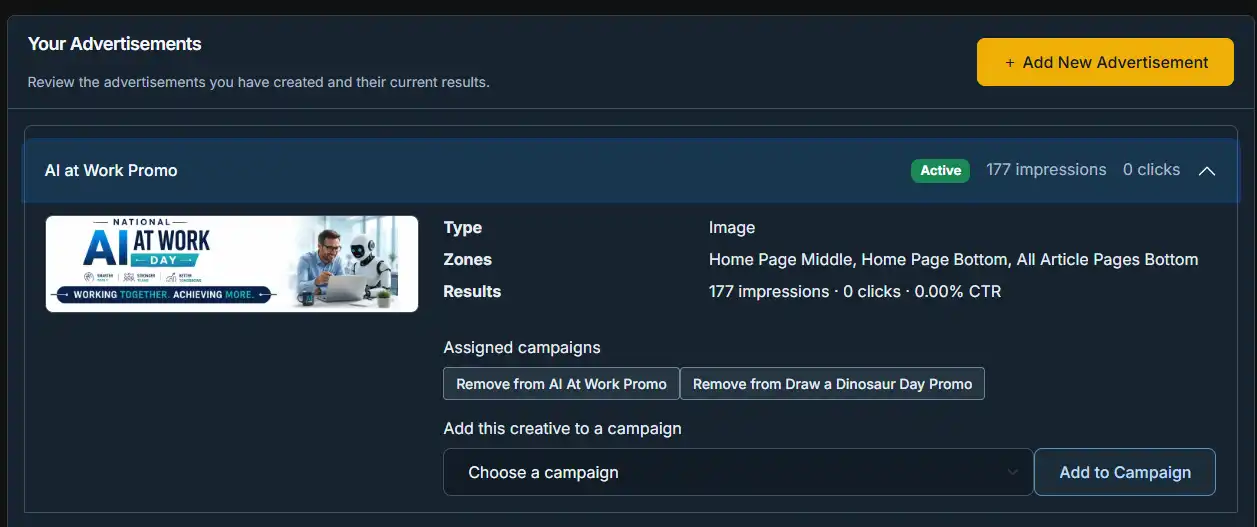
The Your Advertisements section gives advertisers a central location for reviewing the Creatives they have submitted.
Each advertisement initially appears as a compact entry showing its name, current status, Impressions and Clicks. Expanding an entry reveals considerably more information without cluttering the main Dashboard.
Depending upon the advertisement, the expanded information can include its preview, advertisement type, assigned Zones and current performance.
This is particularly useful when an advertisement is running in several locations. Rather than forcing the advertiser to treat every placement as a separate advertisement, WaypointAds can show the Zones associated with the Creative in one place.
Advertisements and Campaigns
WayPointAds deliberately separates Advertisements from Campaigns.
An Advertisement is the Creative—the image or other advertising material being displayed. A Campaign determines how that Creative is being used as part of an advertising effort.
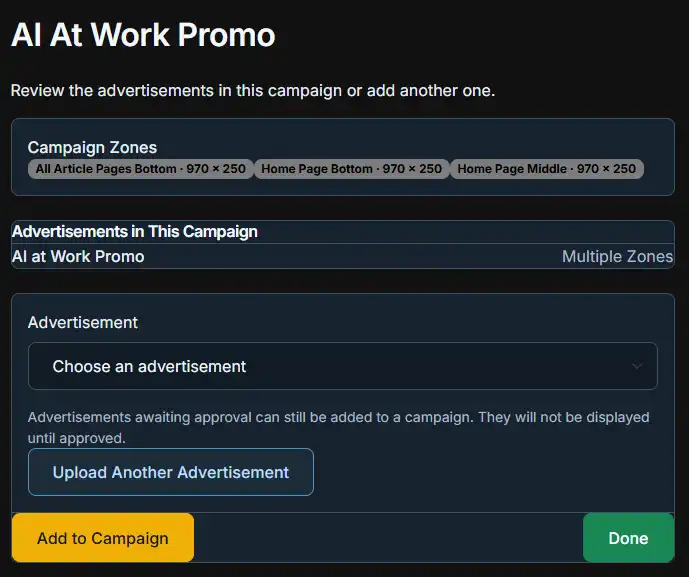
Because of this separation, the same Creative can be associated with more than one Campaign.
Within the expanded advertisement information, the advertiser can see the Campaigns to which that Creative has already been assigned. They can remove it from an existing Campaign or select another Campaign and add the Creative to it.
This avoids requiring advertisers to upload another copy of the same advertisement every time they want to use it elsewhere.
Adding New Advertisements
Advertisers can also select Add New Advertisement to submit another Creative.
Although WaypointAds provides advertisers with the tools necessary to manage their own advertising, this does not bypass the approval system. New material can still be subject to Administrator approval before it becomes eligible for display.
This allows the Advertiser Portal to remain genuinely self-service without turning the website into the Wild West with banner advertisements.
What the Administrator Controls
The Advertiser Portal may belong to the advertiser, but the environment in which it operates is established by you.
Through WaypointAds administration, you determine the advertising structure available to your customers. This includes such things as your Zones, advertising rates, Packages, Credit allowances and approval requirements.
Changes made to the WaypointAds configuration can therefore affect what advertisers see and what options are available to them through the Portal.
The advertiser manages their advertising within the system you have created.
A Separate Environment with Administrator Control
One of the most important features of the Advertiser Portal is that it keeps everyday advertising management separate from Joomla administration. Advertisers do not need access to your Joomla backend simply because they purchase advertising on your website. Their Campaigns, Creatives, Credits and performance information are handled through an environment designed specifically for their role.
That separation does not, however, give advertisers unrestricted control over what appears on your website. WaypointAds includes a permissions and approval structure that allows advertisers to create the Campaigns and Advertisements they need while leaving publication authority with the Administrator. New advertising material can be submitted through the Portal, but it must receive the appropriate approval before it can be displayed.
This gives the advertiser the freedom to do the routine work without requiring the Administrator to build every Campaign or upload every Creative on their behalf. The Administrator remains the gatekeeper, reviewing submitted advertising and deciding what is permitted to run on the website.
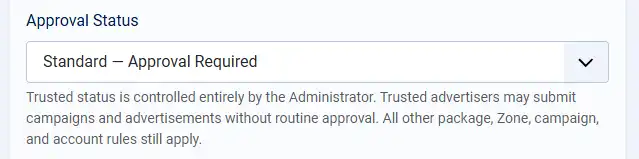
The exception is an advertiser whom you have deliberately designated as a Trusted Advertiser. Trusted status allows an established advertiser to bypass certain routine approval requirements, reducing unnecessary administrative work for customers whose advertising you are comfortable allowing through without individual review.
In other words, the Advertiser Portal provides self-service, not free rein. Advertisers can prepare and manage their advertising, while WaypointAds' permissions and approval system ensures that the Administrator retains the final level of control over what is allowed to appear on the site.
What You Need to Remember
You will probably spend very little time inside the Advertiser Portal yourself, and that is precisely how it should be.
Your job as Administrator is to establish the advertising environment, create the available opportunities, configure the financial arrangements and maintain oversight. The Portal then gives advertisers the tools to work within that environment without requiring you to perform every routine task for them.
It is worth visiting the Portal occasionally with a test advertiser account, particularly after making significant changes to Packages, Zones or other customer-facing settings. Seeing WaypointAds from the advertiser's side is often the quickest way to understand how an administrative change affects the people actually buying your advertising.
Once everything is configured correctly, however, the Advertiser Portal is designed to get the Administrator out of the middle of everyday advertising management—and let WaypointAds do the work.

WaypointAds is a modern advertising solution for Joomla that makes it easy to create campaigns, manage advertisers, organize creatives, and display ads across your website. Built for simplicity, flexibility, and growth, it gives you the tools to keep your advertising running smoothly from a single, intuitive interface.
