WayPointAds
  • Home
  • Help
    • Contact Us
    • Smart Search
      • All Categories
        • WaypointAds - Core
        • WaypointAds - Commercial
        • Installation & Updates
        • Licensing & Activation
        • Payments & Billing
        • Bug Reports
        • Feature Requests
        • Website & Accounts
  • Captain's Log
    • User
      • Login Form
      • Registration Form
      • Account
    • Blog
      • WaypointAds Blog
    • Roadmap
      • Tutorial
      • Documentation
    • Article Layout
    • Development
      • Journey of WaypointAds
      • Developing Smart Zones
      • Dealing With Responsiveness
    • Invoices
    • Release Notes
    • Tips & Tricks

Contact Us

  • 435 County Rd 330, Bunnell, Florida, 32110
  • info@waypointads.com

Monetize Your Joomla Website

  • Create an account
  • Login
WayPointAds
  • Home
  • Help
    • Contact Us
    • Smart Search
      • All Categories
        • WaypointAds - Core
        • WaypointAds - Commercial
        • Installation & Updates
        • Licensing & Activation
        • Payments & Billing
        • Bug Reports
        • Feature Requests
        • Website & Accounts
  • Captain's Log

    User

    • Login Form
    • Registration Form
    • Account

    Development Journal

    • Journey of WaypointAds
    • Developing Smart Zones
    • Dealing With Responsiveness

    Roadmap

    • Tutorial
    • Documentation

    Good Stuff

    • WaypointAds Blog
    • Release Notes
    • Tips & Tricks
Pricing Contact Us

Initial Configuration

Configure WaypointAds with the recommended settings before creating your first advertisement.
Details
Last Updated: 03 September 2026

The WaypointAds Setup Assistant has been designed to help you get your advertising system up and running as quickly as possible. Rather than expecting you to search through menus and configuration screens, the Setup Assistant walks you through the essential steps needed to prepare your website for advertising.

After clicking Begin Setup on the Welcome screen, WaypointAds performs a brief System Check. This verifies that Joomla, PHP, your database connection, file permissions, and the required server components are all ready to support WaypointAds. No changes are made to your website during this process—it simply confirms that everything is in place before continuing.

If every item displays Ready, you're all set. Click Continue Setup to proceed to the next step.
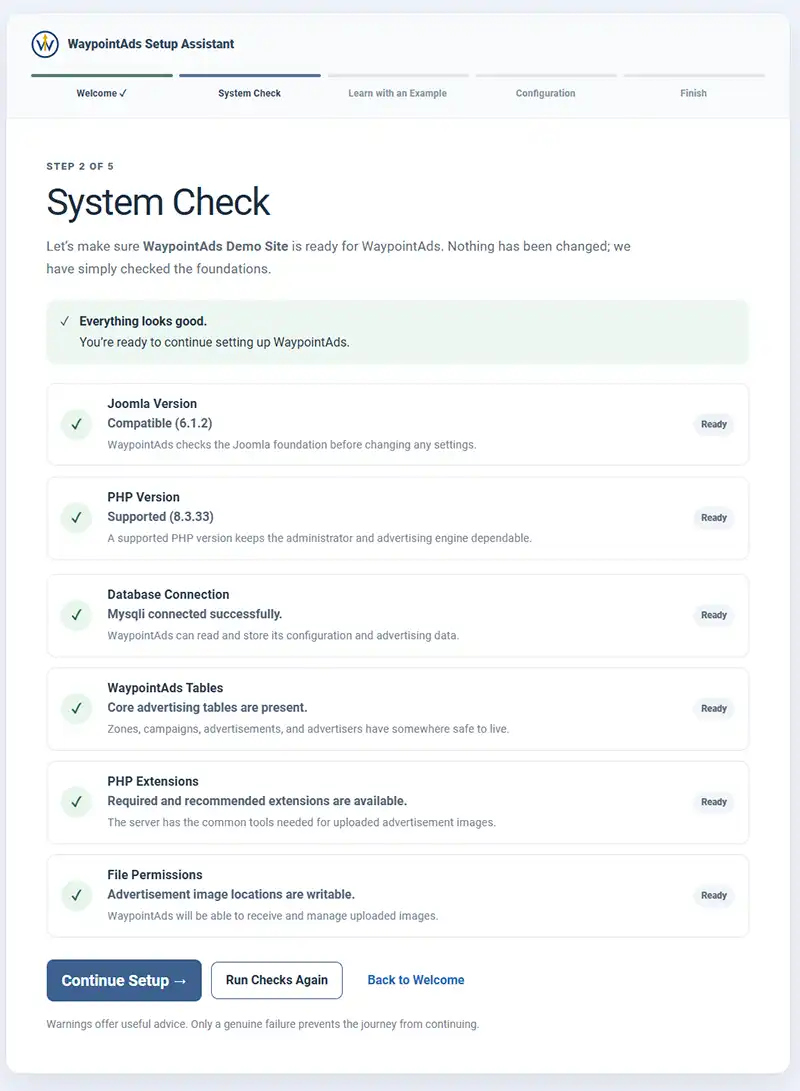
The system check screen which is part of the installation and install verification of WaypointAds


Your website has passed the System Check. Click Continue Setup to move on to the next stage, where WaypointAds demonstrates how advertisements, Zones, Campaigns, and Advertisers work together.

Step 2 – Choose How You Would Like to Begin

Once your system has passed the System Check, click Continue Setup to move to the next stage of the Setup Assistant.

Here you'll choose how you'd like to begin your WaypointAds journey. You have two options, and neither affects your live website. The choice simply determines whether you'd prefer to learn by exploring a working example or by building your advertising system from the ground up.
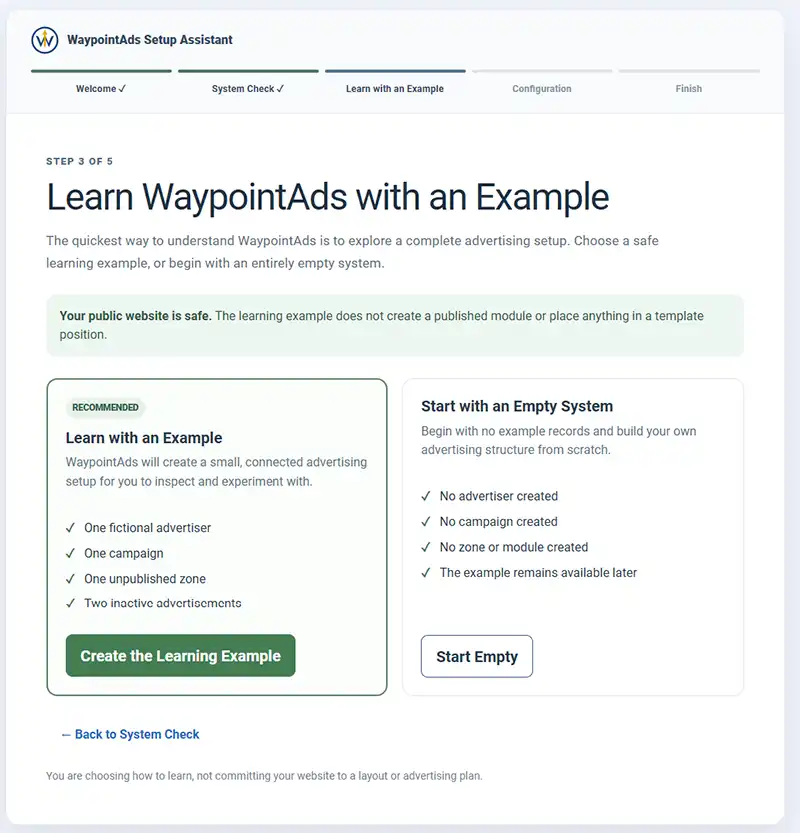
WaypointAds Learn With An Example screen

Learn with an Example (Recommended)

If you're new to WaypointAds, this is the recommended option.

WaypointAds creates a small demonstration advertising system containing a fictional Advertiser, a Campaign, an unpublished Zone, and two inactive Advertisements. Nothing is displayed on your public website, giving you a safe environment to explore how the different parts of WaypointAds work together.

Because the example is completely self-contained, you can inspect every record, experiment with the settings, or remove the example later without affecting your own advertising campaigns.
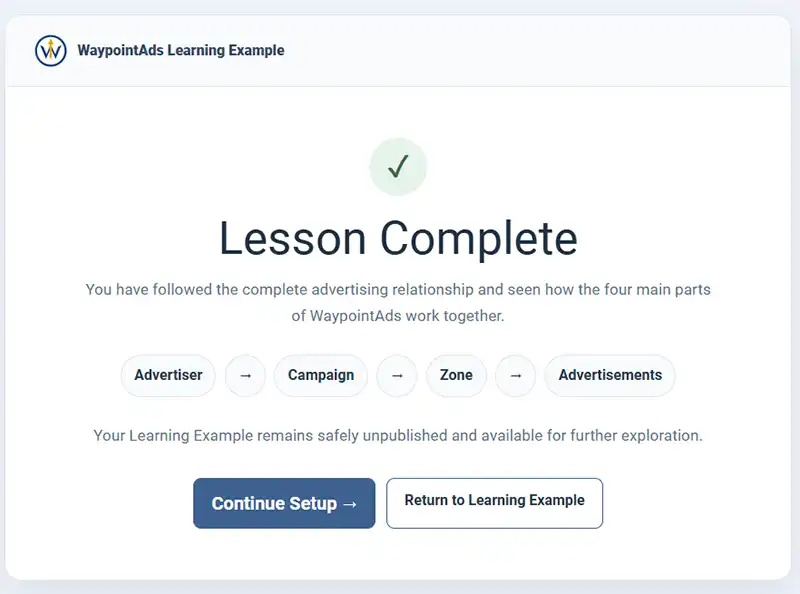
The Lessons Complete Panel on WaypointAds

Start with an Empty System

If you already know how you'd like to organize your advertising, or simply prefer to build everything yourself, choose Start Empty.

No example records are created, allowing you to begin with a completely clean installation. You'll create your own Advertisers, Zones, Campaigns, and Advertisements as you continue through the tutorials.

Both options lead to the same destination. The only difference is whether you'd like a guided example to explore along the way.

 

Previous Continue

Tutorial Menu
  • Core Edition
    • Introduction
    • Installing WaypointAds
    • Initial Configuration
    • Learning WaypointAds
    • Ready To Launch
    • Creating Your First Zone
    • Creating Your First Advertiser
    • Creating Your First Campaign
    • Adding Your First Creative
    • Seeing Your First Advertisement
    • Reading Statistics
    • Creating Additional Zones
    • Managing Campaigns
    • Removing Creatives
    • Next Steps
  • Commercial Edition
    • Installing Commercial
    • Licensing
    • Membership Integration
    • Advertiser Portal
    • Campaign Wizard
    • Selling Packages
    • Rate Cards
    • Billing
    • Managing Customers
    • Automatic Renewals
    • Reports
    • Advanced Configuration
    • Next Steps

WaypointAds Logo

WaypointAds is a modern advertising solution for Joomla that makes it easy to create campaigns, manage advertisers, organize creatives, and display ads across your website. Built for simplicity, flexibility, and growth, it gives you the tools to keep your advertising running smoothly from a single, intuitive interface.

Legal

  • Privacy Policy
  • Terms and Conditions
  • Cookie Policy

Installation & Management

  • Setting Up Paypal
  • Setting Up Stripe

Support

  • Password Reset
  • Privacy Information Request
  • Sitemap
Copyright © 2026 Waypoint Ads. All Rights Reserved.
Joomla! is Free Software released under the GNU General Public License.
Back to top