Installing WaypointAds Community
- Details
Installing WaypointAds is no different from installing most Joomla extensions, but we'll walk through the process together to ensure everything is installed correctly. In just a few minutes you'll have the extension ready for configuration and be one step closer to displaying your first advertisement.
Before you begin, make sure you're logged into your Joomla Administrator account and have downloaded the latest WaypointAds installation package from the official website. If you've already done that, you're ready to begin.
Step 1 – Download WaypointAds
Download the latest Community Edition package from the WaypointAds website and save it somewhere easy to find, such as your Desktop or Downloads folder.
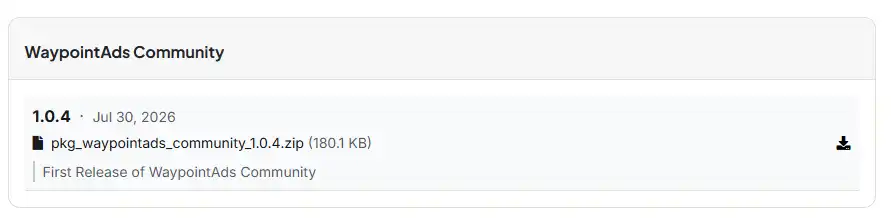
Step 2 – Log in to Joomla Administrator
Open your Joomla Administrator dashboard by navigating to:
https://www.yourwebsite.com/administrator
Enter your Administrator username and password.
Step 3 – Open the Extension Installer
From the Administrator Control Panel, select:
System → Install → Extensions
This opens Joomla's Extension Installer, where new extensions can be uploaded and installed.
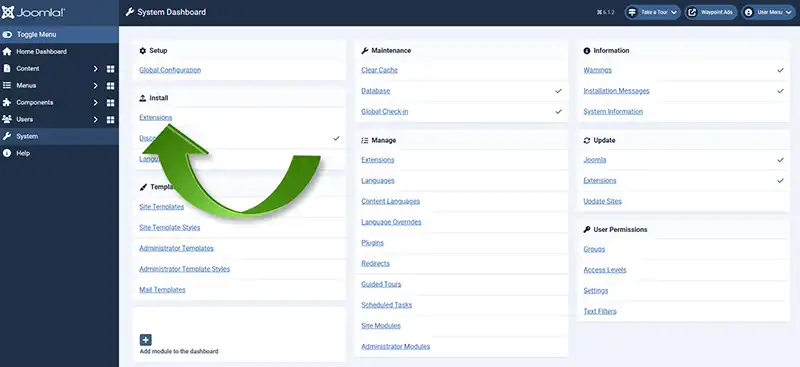
Step 4 – Upload the Installation Package
Either drag the WaypointAds installation package onto the upload area or click Browse for file and select the package you downloaded earlier.
Joomla will upload the package, install the extension, and display a confirmation message when the installation has completed successfully.
Step 5 – Confirm the Installation
Once the installation has completed, WaypointAds displays its own Welcome screen instead of Joomla's standard installation message.
The Welcome screen confirms that the installation was successful and introduces you to the setup process. From here you can either begin the guided setup or jump directly to the WaypointAds Dashboard.
If this is your first time using WaypointAds, we recommend selecting Begin Setup. The guided setup is designed to help you understand the building blocks of a successful advertising system and will prepare your website for its first advertising campaign.

Congratulations!
WaypointAds is now installed and ready to use.
In the next tutorial, we'll configure the extension, review the available options, and prepare your site to display its first advertisement. By the end of the next lesson, your advertising system will be fully configured and ready for you to create your first advertising Zone.Installation of WaypointAds follows the normal Joomla procedure in the backend.

WaypointAds is a modern advertising solution for Joomla that makes it easy to create campaigns, manage advertisers, organize creatives, and display ads across your website. Built for simplicity, flexibility, and growth, it gives you the tools to keep your advertising running smoothly from a single, intuitive interface.
