WayPointAds
  • Home
  • Help
    • Contact Us
    • Smart Search
      • All Categories
        • WaypointAds - Core
        • WaypointAds - Commercial
        • Installation & Updates
        • Licensing & Activation
        • Payments & Billing
        • Bug Reports
        • Feature Requests
        • Website & Accounts
  • Captain's Log
    • User
      • Login Form
      • Registration Form
      • Account
    • Blog
      • WaypointAds Blog
    • Roadmap
      • Tutorial
      • Documentation
    • Article Layout
    • Development
      • Journey of WaypointAds
      • Developing Smart Zones
      • Dealing With Responsiveness
    • Invoices
    • Release Notes
    • Tips & Tricks

Contact Us

  • 435 County Rd 330, Bunnell, Florida, 32110
  • info@waypointads.com

Monetize Your Joomla Website

  • Create an account
  • Login
WayPointAds
  • Home
  • Help
    • Contact Us
    • Smart Search
      • All Categories
        • WaypointAds - Core
        • WaypointAds - Commercial
        • Installation & Updates
        • Licensing & Activation
        • Payments & Billing
        • Bug Reports
        • Feature Requests
        • Website & Accounts
  • Captain's Log

    User

    • Login Form
    • Registration Form
    • Account

    Development Journal

    • Journey of WaypointAds
    • Developing Smart Zones
    • Dealing With Responsiveness

    Roadmap

    • Tutorial
    • Documentation

    Good Stuff

    • WaypointAds Blog
    • Release Notes
    • Tips & Tricks
Pricing Contact Us

Licensing

Getting The Most Out of WaypointAds
Details
Last Updated: 03 September 2026

Activating WaypointAds Commercial

Installing WaypointAds Commercial gives you the software, but the Commercial features must be activated using your WaypointAds license key.

Your license key is available from your WaypointAds account. Sign in to your WaypointAds account and select Licenses. This is where you can view the license keys associated with your account and their activations.
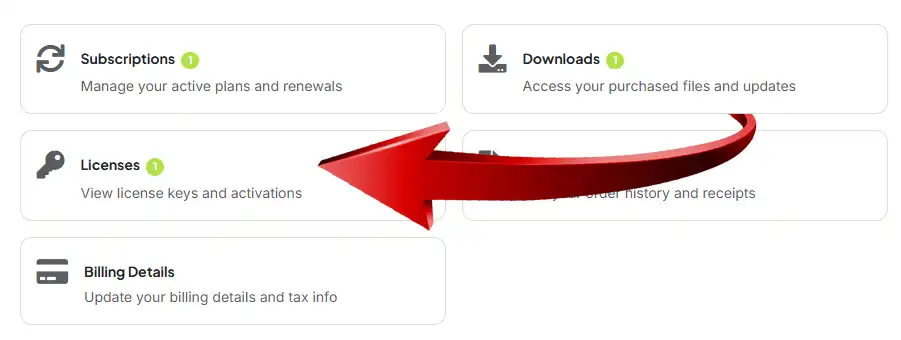
The Account Panel at WaypointAds

Copy the appropriate WaypointAds license key and return to your Joomla Administrator.

Open WaypointAds and go to the Commercial Features area. Components > WaypointAds > License (at the top of the page)
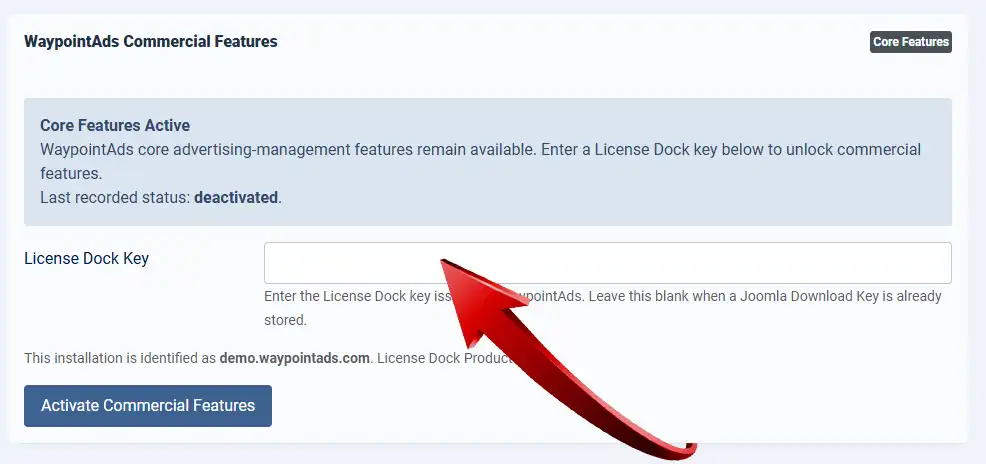
Commercial Activation Panel at WaypointAds

When Commercial has not yet been activated, WaypointAds will continue operating with its Core features and will display the current license status.

Paste your license key into the License Dock Key field and select Activate Commercial Features.

WaypointAds will validate the license for the website shown on the screen. Once activation has been successfully completed, the additional Commercial features become available. Your existing Core configuration, Zones, Campaigns, and Creatives remain in place; activation simply opens the additional capabilities provided by the Commercial Edition.

Your license remains associated with your WaypointAds account, so there is no need to memorize it or scribble it on a piece of paper destined to disappear beneath your keyboard.

If Commercial Is Not Activated

WaypointAds does not become unusable if a Commercial license is not active. The Core features remain available, while features requiring a Commercial license remain unavailable until a valid license is activated.

This also means that activating Commercial is an upgrade to the capabilities of the existing WaypointAds installation rather than the beginning of an entirely separate advertising system.

Once the license has been activated, return to the WaypointAds Dashboard.

Now we can start looking at what Commercial actually adds — and this is where WaypointAds begins handing considerably more of the advertising workload to your advertisers.

 

Previous Continue

Tutorial Menu
  • Core Edition
    • Introduction
    • Installing WaypointAds
    • Initial Configuration
    • Learning WaypointAds
    • Ready To Launch
    • Creating Your First Zone
    • Creating Your First Advertiser
    • Creating Your First Campaign
    • Adding Your First Creative
    • Seeing Your First Advertisement
    • Reading Statistics
    • Creating Additional Zones
    • Managing Campaigns
    • Removing Creatives
    • Next Steps
  • Commercial Edition
    • Installing Commercial
    • Licensing
    • Membership Integration
    • Advertiser Portal
    • Campaign Wizard
    • Selling Packages
    • Rate Cards
    • Billing
    • Managing Customers
    • Automatic Renewals
    • Reports
    • Advanced Configuration
    • Next Steps

WaypointAds Logo

WaypointAds is a modern advertising solution for Joomla that makes it easy to create campaigns, manage advertisers, organize creatives, and display ads across your website. Built for simplicity, flexibility, and growth, it gives you the tools to keep your advertising running smoothly from a single, intuitive interface.

Legal

  • Privacy Policy
  • Terms and Conditions
  • Cookie Policy

Installation & Management

  • Setting Up Paypal
  • Setting Up Stripe

Support

  • Password Reset
  • Privacy Information Request
  • Sitemap
Copyright © 2026 Waypoint Ads. All Rights Reserved.
Joomla! is Free Software released under the GNU General Public License.
Back to top