- Details
Creating Your First Zone
Congratulations! WaypointAds is now installed and ready to do some real work.
The Setup Assistant created a Learning Example Zone so you could see how a completed Zone looks. You can leave it in place, edit it later, or delete it when you're comfortable with WaypointAds. Any other Zones you have previously created will also appear in the list on the right.
Now let's create your first real Advertising Zone.
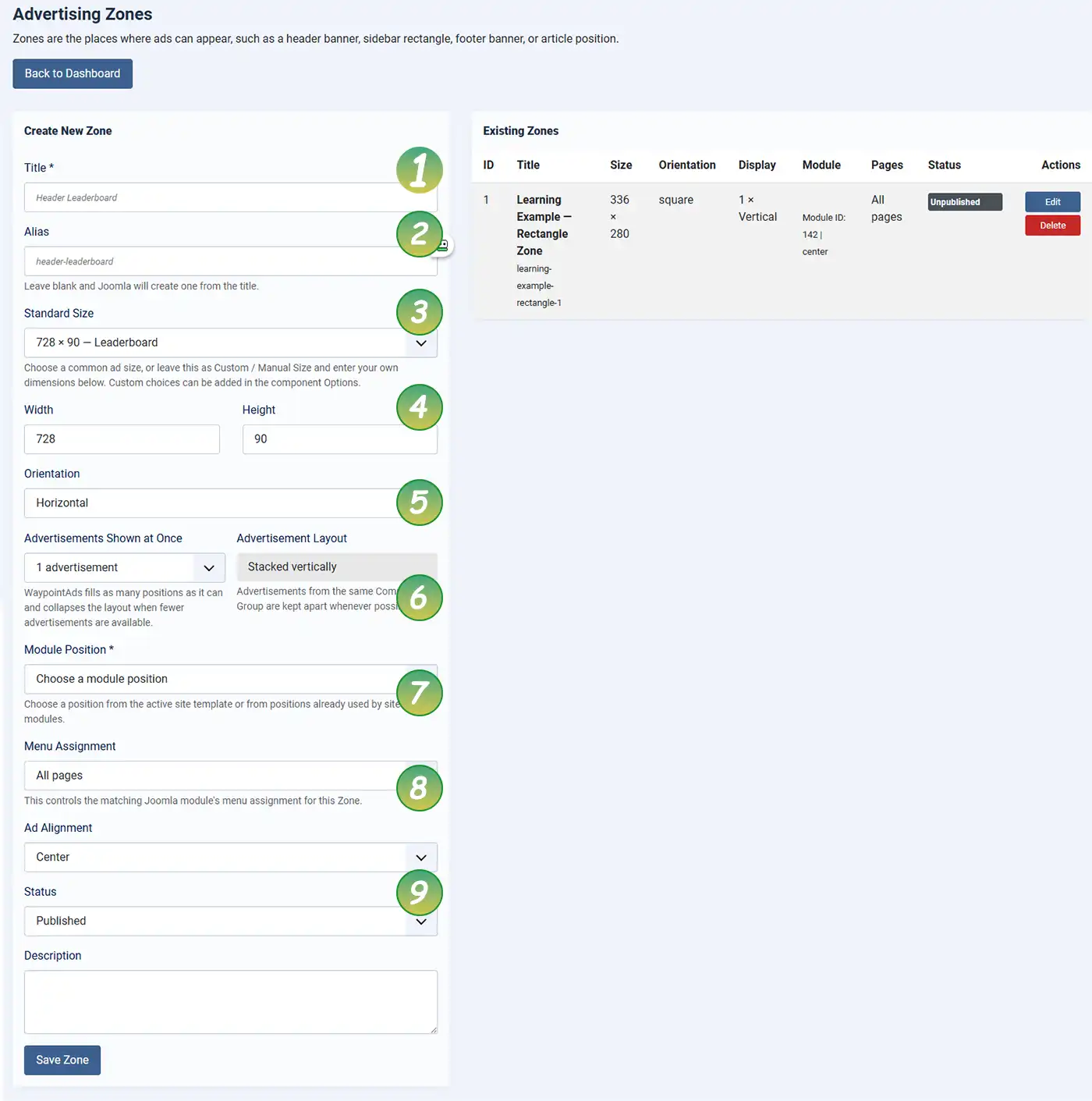
Zone Settings
Use the numbered guide below to complete each field.
- Title: Give your Zone a meaningful name, such as Homepage Leaderboard, Sidebar Rectangle, or Article Footer Banner. A descriptive title makes it much easier to identify the Zone later.
- Alias: Leave this blank unless you have a specific reason to create your own alias. Joomla will automatically generate one from the Zone title.
- Standard Size: Select one of the common advertising sizes from the list. If your required size isn't listed, choose Custom / Manual Size and enter the dimensions yourself.
- Width and Height: These values are filled automatically when you select a standard size. If you chose a custom size, enter the required pixel dimensions here.
- Orientation: Choose whether this Zone is Horizontal, Vertical, or Square. This helps WaypointAds organize Zones and assists advertisers when selecting placements.
- Advertisements Shown at Once / Advertisement Layout: Choose how many advertisements this Zone can display simultaneously. If more than one advertisement is allowed, select how they should be arranged. WaypointAds will automatically collapse unused positions whenever fewer advertisements are available, keeping your pages looking clean and professional.
- Module Position: Select the Joomla module position where this Zone will appear. WaypointAds automatically creates and manages the required Joomla module for you, so there's nothing additional to configure.
- Menu Assignment: Choose where this Zone should appear. You can display it across your entire website or limit it to specific menu items, giving you complete control over ad placement.
- Status: Set the Zone to Published when you're ready for advertisements to appear. If you're still configuring your site, leave it Unpublished until everything is ready.
Important: Module Ordering
WaypointAds automatically creates and manages the Joomla module that displays each Advertising Zone. However, the order in which modules appear within the same Joomla module position is controlled by Joomla itself, not by WaypointAds.
If you have multiple modules assigned to the same position—for example, a custom HTML module, a login module, and a WaypointAds Zone—you should adjust their display order using Joomla's standard Module Manager. This allows WaypointAds to work naturally alongside every other Joomla module without changing Joomla's normal behavior.
Additional Options
Below the numbered fields you'll also find a Description box. This is optional but can be useful for recording notes about the purpose of the Zone, who requested it, or where it is intended to be used.
When you're satisfied with your settings, click Save Zone.
Your new Zone will immediately appear in the Existing Zones list on the right-hand side of the screen, alongside the Learning Example Zone and any other Zones you've already created.
Well done! You've created the foundation of your advertising system. Every advertisement displayed by WaypointAds will eventually appear in one of the Zones you create, making this one of the most important steps in configuring your site.

WaypointAds is a modern advertising solution for Joomla that makes it easy to create campaigns, manage advertisers, organize creatives, and display ads across your website. Built for simplicity, flexibility, and growth, it gives you the tools to keep your advertising running smoothly from a single, intuitive interface.
